
AI Agents in Production: The Foundations
Part 1: A Practical Introduction

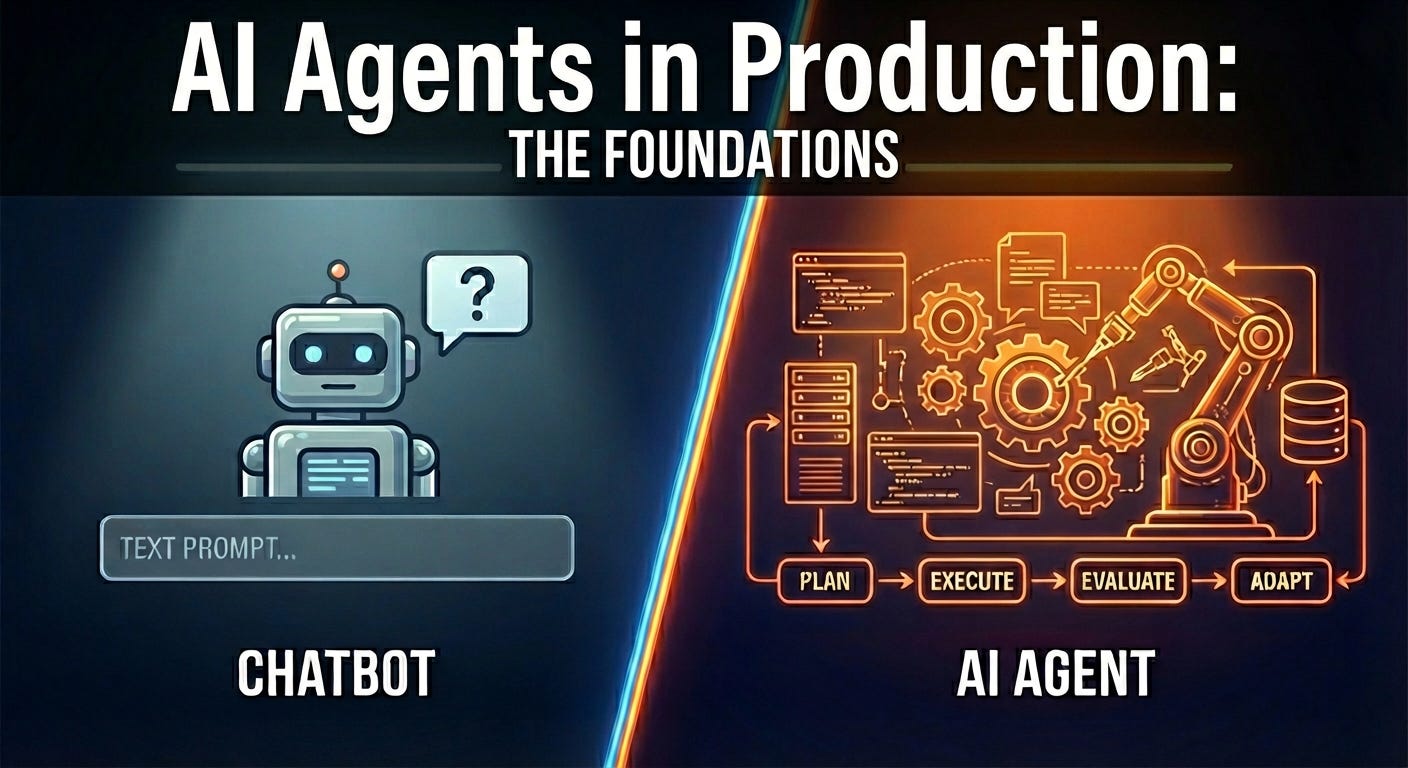
I’ve lost count of the times someone showed me their “AI agent” and it turned out to be a chatbot with good marketing. The confusion is understandable: both use LLM and both respond in natural language, but the difference matters more than most people realize.
Here’s the quick test: Does it wait for a prompt, respond, and stop? That’s a chatbot. Does it receive a goal, plan steps, execute tools, evaluate results, and loop until completion? That’s an agent.
Agents are fundamentally different from the single-call LLM patterns that today dominate most implementations. Agents loop. They plan. They fail, retry, and adapt. They interact with external systems, manage state, and operate autonomously. The architecture changes. The testing changes. The whole operational playbook changes.
This new series of articles will cover the practical side of building agents for production, from foundational definitions to deployment checklists. Every article links to working code in fm-app-toolkit and agentic-design-patterns. No theory without implementation.
To understand agents, we need context (just like the agent itself :P). Let’s start engineering the context around agents so we can generate meaningful insights.
The Software Evolution
Think about how search has evolved. Ten years ago, you’d match keywords against document titles. Five years ago, you’d compute embedding similarity to find semantically related content. Today, you might give a search application a goal in natural language (”Find me resources on async Python testing, specifically mocking strategies”), and it is capable of using an LLM (reasoning engine) to reformulate queries, search multiple sources, evaluate result quality, and asks clarifying questions.
This progression was intelligently defined by Andrej Karpathy as Software 1.0, 2.0, and 3.0.
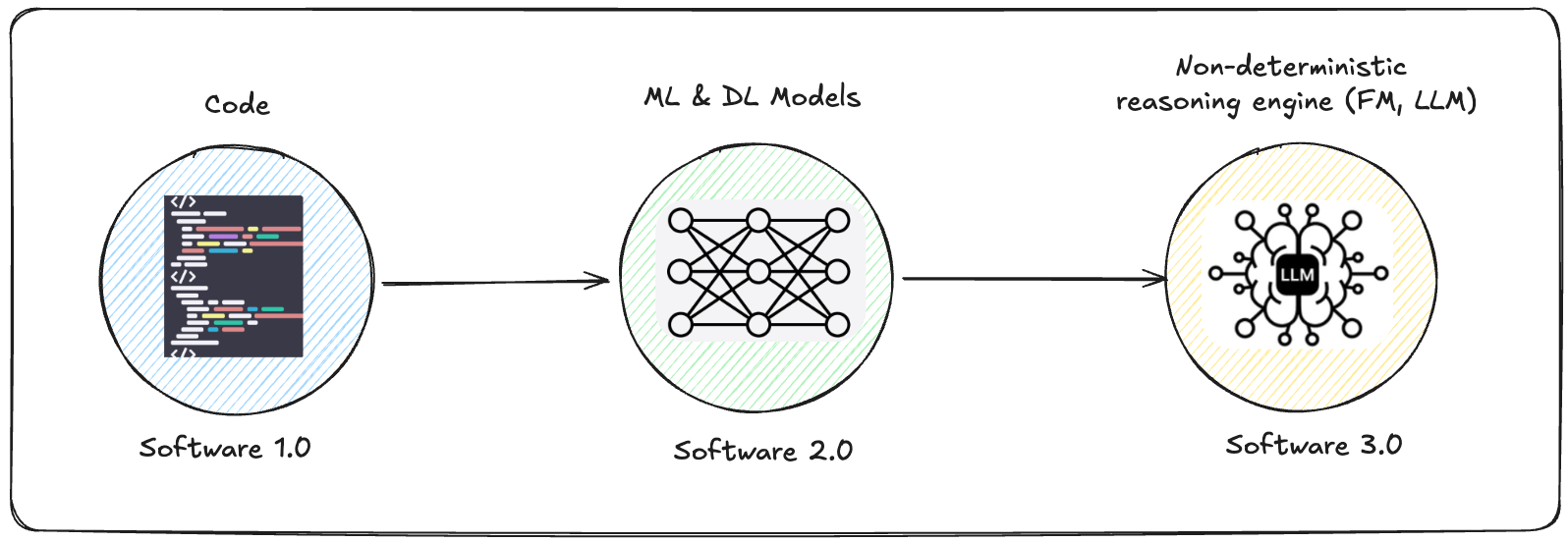
Software 1.0 represents applications were the bussiness logic is writen entirely in source code, there are no trained models or vendor FMs used to power them. You write `if “python” in query: return docs_with_tag(”python”)` and the computer follows orders.
Software 2.0 are machine learning and deep learning models, the business logic is encoded in the weights and distributions of the models. You feed a neural network thousands of search queries and their clicked results, and it learns relevance patterns you couldn’t articulate. The intelligence lives in the training data. When you run `model.find_similar(embed(query), top_k=10)`, it returns ranked results.
Software 3.0 is where the paradigm shifts. The core is a reasoning engine (an LLM, FM to be more precise) that can understand context, plan actions, and make decisions at runtime. The software applications use these reasoning engines along with specific software implementations patterns to encode and enhance business logic in a way we had never seen before.
Here’s the key insight: Software 3.0 is defined by the use of a reasoning engine, not by how much autonomy the software application itself has.
The reasoning engine can work in two modes:
1. Execute a predefined workflow: Follow steps you’ve designed. Retrieve documents, generate a summary, format the output. The LLM handles each step, but you control the flow. Lower autonomy, more predictable.
2. Make autonomous decisions: Choose which tools to use, when to use them, what to do with results. The LLM plans its own execution path. Higher autonomy, more flexible.
A chatbot that completes a single prompt-response cycle is Software 3.0. A RAG system that retrieves documents and generates summaries is Software 3.0. A multi-agent system that coordinates specialists for hours is also Software 3.0. They all use the same reasoning engine. What differs is how much control you give the LLM over execution flow.
The spectrum from low to high autonomy isn’t about whether you’re using Software 3.0. You’re using it the moment you have a reasoning engine. The question is: how much decision-making authority does the LLM have?
The Autonomy Spectrum
All LLM-powered applications are Software 3.0. What differs is how much control you give the LLM over execution flow. This isn’t a binary choice between “AI” and “not AI.” It’s a spectrum, and where you land on it determines your debugging nightmares.
Harrison Chase articulated this taxonomy in ”What is a Cognitive Architecture?”, mapping LLM-powered systems to six levels based on what the LLM controls:
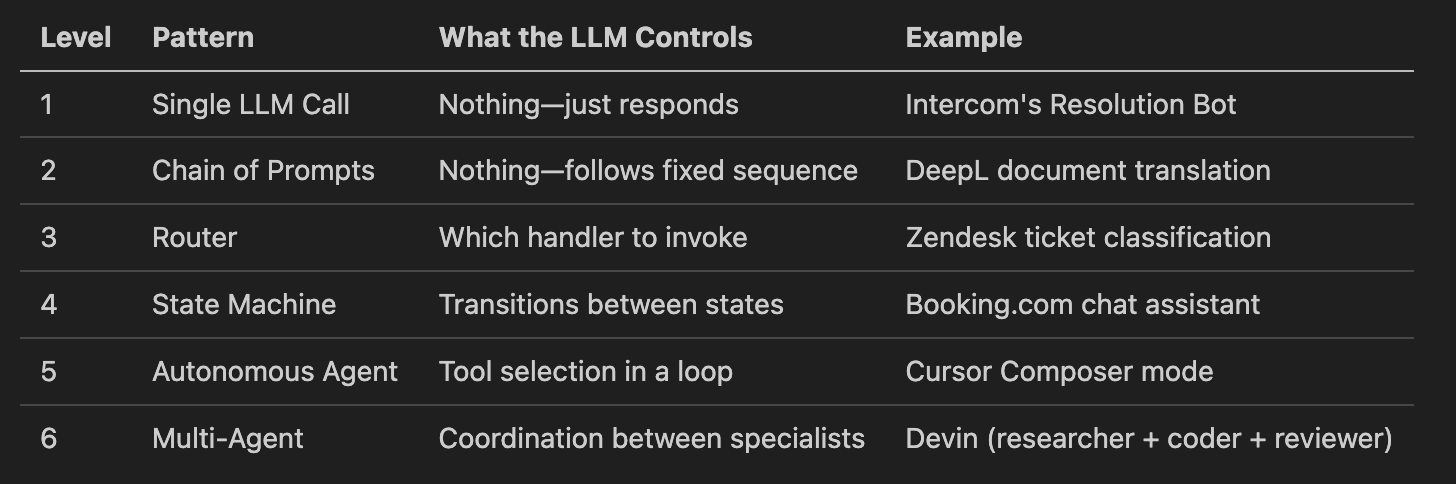
To see this graphically:
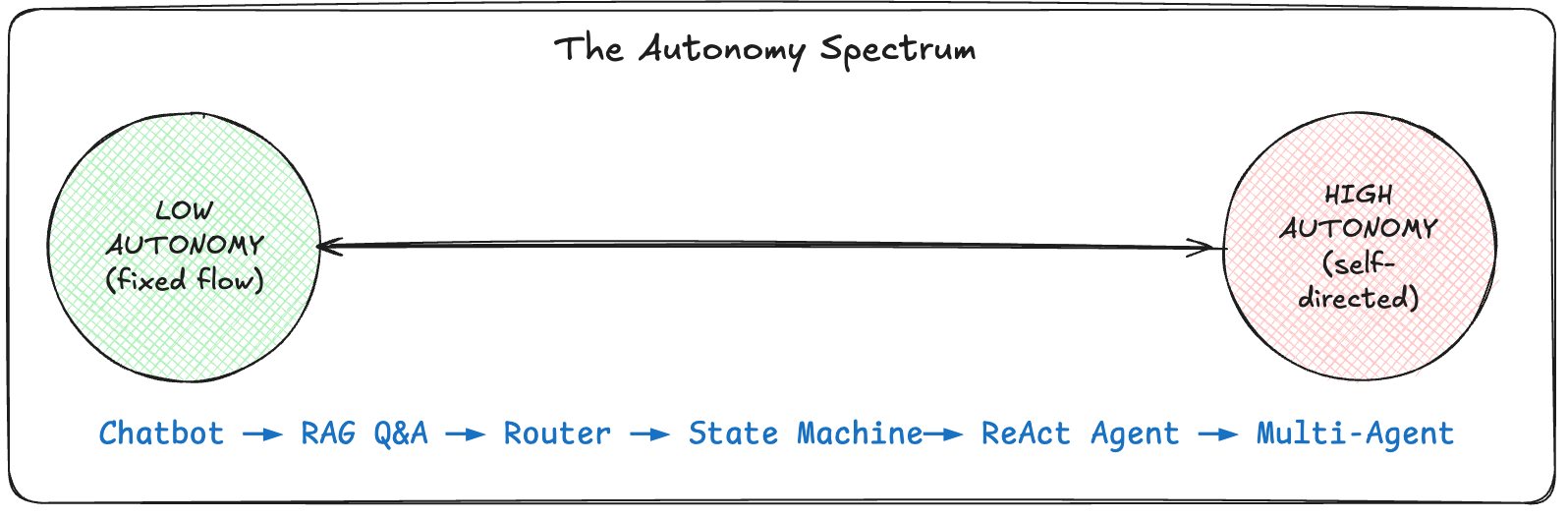
These last few years I’ve had the chance (I’m enormously grateful) to built different production-grade systems across this spectrum. At Coveo, our multi-tenant RAG based Q&A system sat at Level 2: chains of prompts with semantic search, deployed to enterprise clients worldwide. Later, building a job search agent for a Bounteous client (a US-based talent acquisition cloud platform that helps enterprises match candidates to opportunities), I jumped to Level 5. The LLM decided which databases to query, how to match skills to job requirements, when to ask clarifying questions. The debugging experience was completely different. Below Level 4, you’re tracing linear flows. Above it, you’re watching state transitions and emergent behavior unfold in real time.
Karpathy captured it perfectly at YC AI Startup School:
“The right way to think about agents is as an autonomy dial you can turn up or down.”
Start at low autonomy. Earn trust through iteration. A chatbot that works beats an autonomous agent that hallucinates.
So where do we draw the line? Simon Willison’s definition cut through the noise and became the production standard.
The Production Definition
I spent months watching the industry argue past each other about what “agent” meant. Academic papers talked about agents as autonomous entities in RL environments. Marketing teams slapped “agent” on anything with an LLM. Framework maintainers used it differently from each other. Everyone was building the same primitives with incompatible vocabularies.
Then Simon Willison published a definition that cut through the noise:
“An LLM agent runs tools in a loop to achieve a goal.”
This was cleaner and directly implementable. It mapped directly to the code patterns everyone was already writing. Within weeks, Anthropic adopted it in their docs. OpenAI integrated it into their SDK. The major frameworks converged. Not because it was academically rigorous, but because it mapped to abstractions engineers were already building.
Three pieces make this work:
Tools are capabilities the agent can request. In a job search agent I built, that meant querying Snowflake for candidate history, running skill-matching algorithms against job requirements, and fetching real-time job postings from partner APIs. The LLM doesn’t execute these directly. It generates tool requests in a structured format (usually JSON), and your harness (the orchestration layer you write) executes them in the real world. I capped iterations at 10 using LlamaIndex’s `max_iterations` parameter: enough for complex searches, bounded enough to prevent runaway costs.
In a loop means the LLM sees the tool result and decides what to do next. The agent requests an action, the harness executes it, and the result feeds back into context. The agent iterates until it’s done. This is the key difference from a workflow: the execution path isn’t predetermined.
To achieve a goal means it runs until it’s done. The agent doesn’t loop forever. It’s working toward a specific outcome: answer a question, complete a task, satisfy a constraint. When it hits that outcome, the loop terminates.
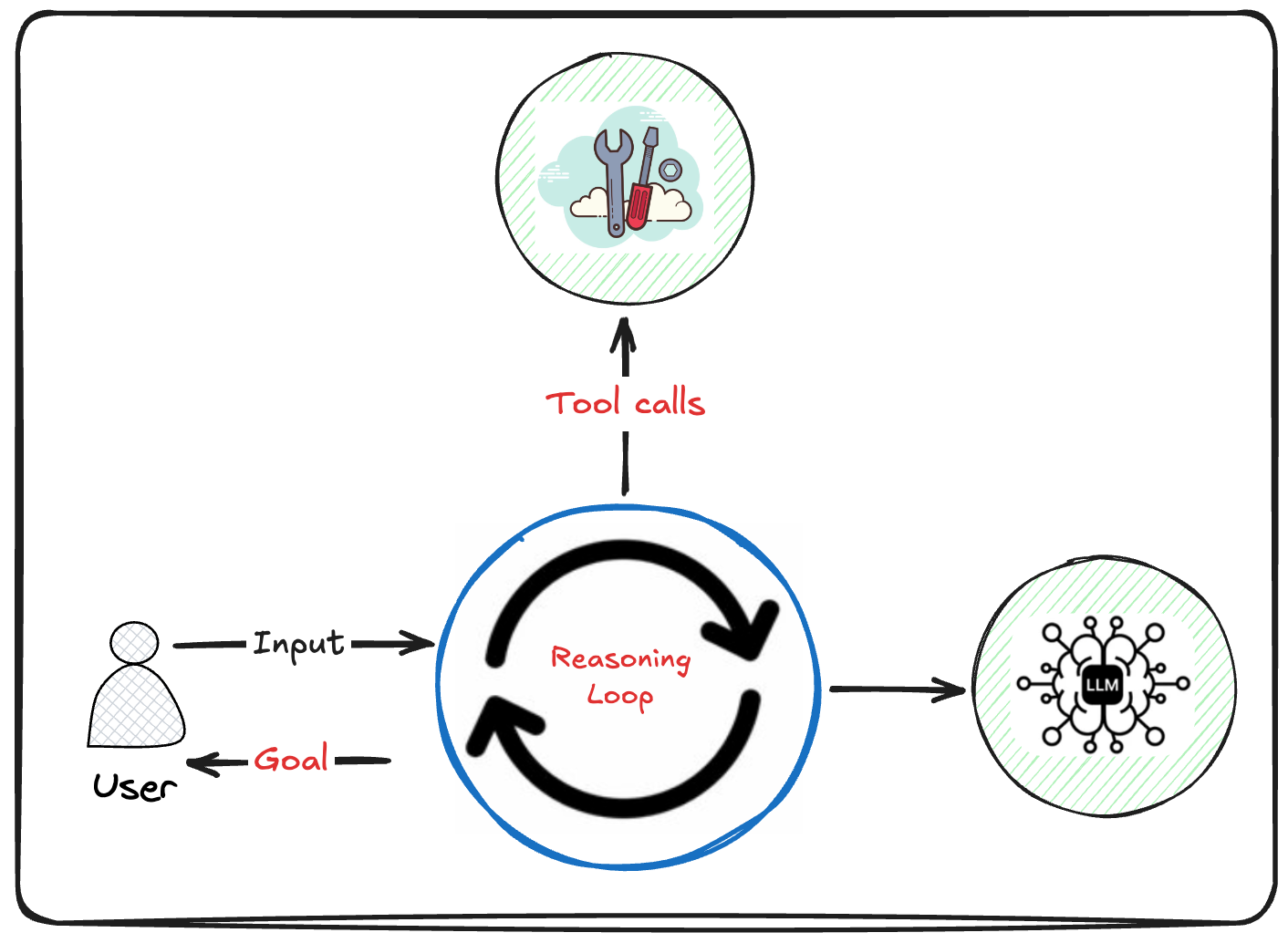
Memory is built into this model. Short-term memory is the context window. Long-term memory is just another tool: read from vector DB, write to vector DB. Same loop, different capability.
This definition won because it’s verifiable. Does it run tools? Does it loop? Does it have a goal? No to any of those? It’s not an agent. It’s something else. And “something else” might be exactly what you need.
The real question: when do you want this loop?
Workflows vs Agents
I’ve watched teams rebrand perfectly good if-else logic as “AI agents” to impress stakeholders. Most production systems that claim to use agents are actually using workflows, and that’s not a weakness. It’s smart engineering.
Anthropic’s Building Effective Agents guide draws a useful distinction:
Workflows are LLMs orchestrated through predefined code paths. You control the decision tree. The LLM acts at specific steps, but you’ve mapped the territory. Cheaper (1-3 LLM calls), more reliable, less flexible. Use workflows for RAG Q&A, classification, anything with known paths.
Agents are LLM-directed. The model decides what to do next, which tools to use, when to stop. More expensive (4-15+ calls), less predictable, more flexible. Use agents for research, debugging, and exploratory analysis: tasks where you can’t map every branch upfront.
I learned this building multi-tenant systems for different clients across north America. More than once I deployed RAG systems that ingested documentation for different clients and served tailored answers to each client. The architecture was straightforward: semantic search handled retrieval, a simple chain of prompts handled generation. This workflow approach (Level 2) gave us predictable costs and reliable performance at scale. We could have built an agent system for more flexibility, but we didn’t need it. The workflow was powerful enough for sophisticated multi-tenant use cases without the complexity or cost of autonomous decision-making.
In production, most systems use hybrid patterns: workflows for the 80% case, agents for complex scenarios, humans for edge cases. The key is building systems with an autonomy dial that lets users turn it up when they need leverage, down when they need control. As Karpathy put it at YC AI Startup School: ”It’s less Iron Man robots and more Iron Man suits.”
Anthropic’s guidance: ”Start with workflows, add autonomy where needed.” If you can define the decision tree, use a workflow. Only introduce agent complexity when branching logic justifies the cost and the debugging effort.
Here’s the uncomfortable truth: most teams pick agents when they need workflows, burn 10x the budget learning the difference, and then face a harder question. Even when you do need an agent, how long until it’s production-ready?
The Reality Check
Your CEO just asked when the AI agents will be ready to handle customer support. Your VP read an article claiming “2025 is the year of agents.” At YC’s AI Startup School in June 2025, Karpathy addressed this timeline pressure directly: “When I see things like, ‘2025 is the year of agents,’ I get very concerned... this is the decade of agents.“
The gap between demo and production is vast. Your agent aces 90% of test cases in development, then fails spectacularly on edge cases that take 3-6 months of production traffic to surface. As one engineer crystallized it: ”demo is works.any(), product is works.all().” Working for a client in the US, I inherited an email generation system that hallucinated hireing campaigns and exhibited non-deterministic behavior across identical inputs. The fix wasn’t prompt engineering. It required rearchitecting the pipeline to eliminate the failure modes entirely. Some problems require structural solutions, not cleverer prompts.
LLMs exhibit what researchers call “jagged intelligence”: superhuman at code generation, unable to count letters reliably. This isn’t a bug you can patch. It’s the nature of the technology, which means your agent might handle complex API integrations flawlessly but fail on validation tasks you’d never think to test.
The solution? Deploy at low autonomy, accumulate edge cases in production, refine your prompts and evals, and gradually increase autonomy over quarters, not sprints. Keep humans in the loop, especially when mistakes have consequences.
AI Agents in Production Series
The Foundations ← You are here
The Three-Layer Architecture: The Harness, the Model, and the Loop
LlamaIndex vs PydanticAI vs LangGraph
Agent Observability: Traces, Evals, Alerts
5 Agentic Design Patterns That Actually Work
In the next article, we’ll unpack the three-layer architecture that makes agents practical to build: the **harness** (where you write code), the **model** (the black box you prompt), and the **loop pattern** that connects them.
References
- Software 3.0 — Andrej Karpathy’s framework for understanding LLM-based software
- What is a Cognitive Architecture? — Harrison Chase on autonomy levels
- Agents — Simon Willison’s production definition
- Building Effective Agents — Anthropic’s workflows vs agents guide
- YC AI Startup School— Karpathy on the “decade of agents”
"Start with workflows, not agents" is the perfect advice!
For those who need reliability now, Monobot.ai is the answer. Their platform provides the structured Monobot Flows to build predictable, Level 2/3 automation, letting you deploy a reliable system before wrestling with Level 5 autonomy.
I think it's better to use existing platforms to create your own AI bot for voice and chat than "reinventing the wheel"
The agent looping definition is so clear. What's next for testing?