
The Autonomous Website Template
Building Websites Through Conversation

After building aiee.io, botbrewers.ca, and several others this year, we noticed the same pattern repeating. Whether we used AI tools to vibe-code them or built them carefully by hand, the process was the same: set up the structure, customize the theme, validate responsive design, deploy. The initial architecture didn’t change much site-to-site.
So we built a template for ourselves. It automates the repetitive parts and lets us focus on what makes each site unique. We’re sharing it now because it might be useful if you’re building similar sites.
The template works with Claude Code, leveraging a subsystem of agents with specific skills to execute development workflows. These workflows (setup, customization, deployment) are encoded in natural language within the template itself. Here’s what that looks like:
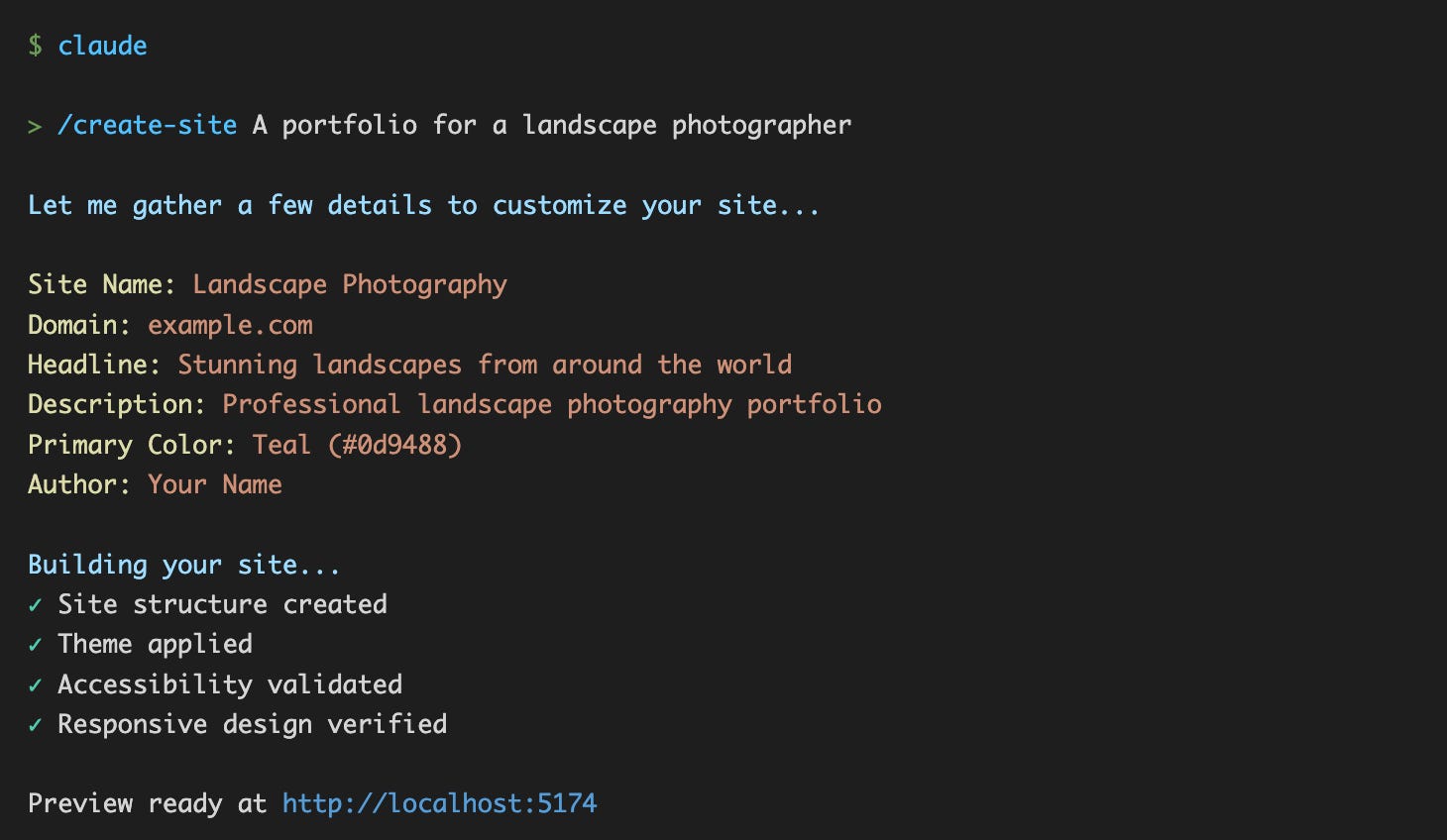
Behind that output, the template just executed its own development workflow. Type /create-site, and the orchestrator runs a command that gathers details through interactive questions, then delegates to web-dev-agent for implementation and web-qa-agent for validation. The workflow asks you to choose a color theme and provide content, then the dev agent applies those choices as CSS variables and HTML structure. The QA agent validates accessibility and responsive design before preview. You describe what you want; the system develops and validates itself.
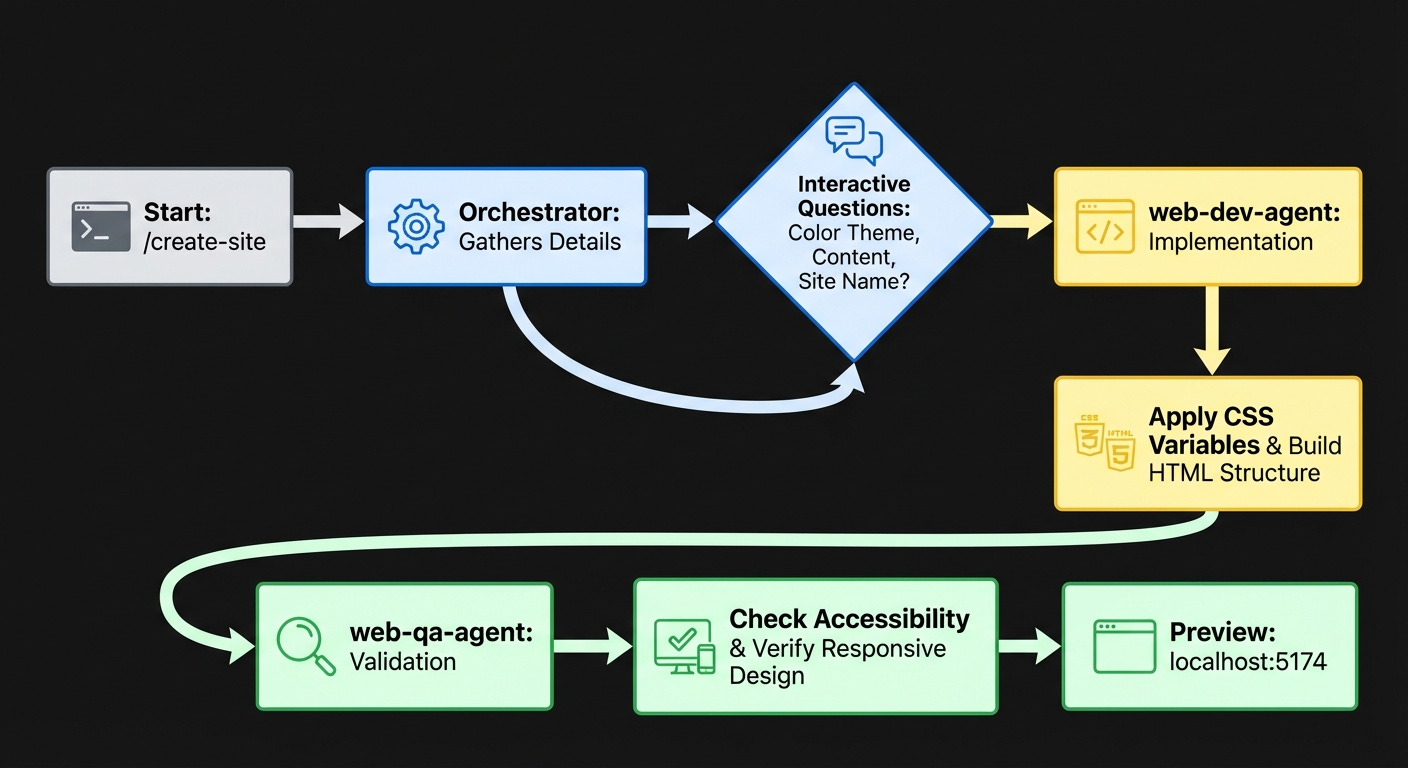
It’s a self-developing system: templates that know how to modify themselves.
Three Components That Make It Work
That three-minute build involves three layers working together: an orchestrator, skills, and agents.
The Orchestrator (.claude/CLAUDE.md) routes requests to the appropriate handler based on keywords and intent. Type /create-site and it invokes the website-setup skill. Type “deploy” and it invokes deployment-guide. Ask for custom changes like “add testimonials” and it calls web-dev-agent. The routing is explicit and debuggable. Each request maps to a specific skill or agent.
The Skills (.claude/skills/) handle common workflows. Six skills cover development and quality:
website-setup- Interactive wizard for initial site creationcolor-theming- Brand customization with color pickerdeployment-guide- Walks you through SiteGround deploymentaccessibility-check- WCAG 2.1 AA validationseo-validation- Checks SEO and meta tagsvisual-test- Responsive design validation
Each skill is a focused conversation flow that asks questions, validates inputs, and hands off implementation to the agents.
The Agents (.claude/agents/) implement and review changes. Two agents coordinate:
web-dev-agent- Implements HTML/CSS/JS changesweb-qa-agent- Reviews for accessibility, SEO, performance
When you ask to “add a testimonials section”, the dev agent scans for structural patterns, generates the code, then the QA agent validates it before showing you the preview. Every change goes through this workflow: implementation → quality review → preview.
We deployed a site with broken mobile nav once. That’s when we added QA to the workflow.
After rebuilding similar patterns across aiee.io, botbrewers.ca, and metamathematics.ai, we realized we were spending 80% of our time on repetitive setup. Now we spend about 20% of our time developing the specialists that develop the solutions. The agents and skills encode those patterns so the template can apply them automatically.
Two Ways to Use This
This isn’t Webflow or a static site generator—you own the codebase and develop through conversation.
Click “Use this template” on GitHub to create your repository, clone it locally, then run claude. Three minutes later, you have a working site. No configuration files, no build steps, just conversation with Claude.
Build a site today. Three commands get you a working site. Describe what you want in conversation, make changes the same way. Works for static sites (no databases needed). Everything happens through natural language.
Learn the pattern for your own projects. The orchestrator shows real request routing in action. Read the agent prompts to understand how they preserve design patterns while implementing changes. Then apply what you learned to your own repeatable project types.
What This Won’t Build
Complex applications with databases or backend logic
E-commerce platforms with payment processing
Sites requiring server-side authentication
Prerequisites: Claude Code, basic understanding of web development
Best for: Landing pages, portfolios, documentation sites, static marketing sites
Whether you’re shipping today or learning for tomorrow, the code is documented and ready.
Try It Yourself
You can build and deploy a production website by describing it in three sentences.
Here’s what that looks like:
Click “Use this template” at the repository
Create your new repository on GitHub
Clone and launch:

Type your idea, hit enter, and it starts asking questions. “What’s your site about?” “Who’s your audience?” “Brand colors?” The agent uses these answers as hard design constraints—vague inputs produce generic sites. Then the QA agent validates accessibility, SEO, and responsive design before showing you the preview at localhost:5174.
The QA agent catches real problems. When we tested this with a dark blue on black color scheme, it immediately flagged contrast failures that would have violated WCAG standards. The same test caught a layout break on mobile at 375px width. Missing alt text, layout breaks on small screens, each error with a line number and the specific standard it violated. Not vague warnings, actionable fixes.
Need a pricing section? Say what you want:

The dev agent builds it, the QA agent validates it, then you see the preview update. Every change (typo fixes, layout tweaks, new sections) goes through the same cycle. No broken states, no “forgot to test mobile” surprises.
Ready to deploy? Type “deploy” and the deployment-guide skill walks you through the GitHub Actions setup. Sub-minute deploys to SiteGround via rsync (after GitHub Actions builds).
The entire development workflow happens through conversation. Describe what you want and the agents handle implementation.
Beyond Websites
The same pattern handles backend APIs, data pipelines, and microservices.
Swap the domain-specific skills, keep the orchestrator. We tested this with a Python API template—ported the orchestrator in an afternoon. Swapped color-theming for endpoint-design, updated the agent’s FastAPI knowledge, and the rest just worked. Same coordination logic, different domain.
The pattern applies to repeatable projects:
Web development (this template)
Backend services (Python API template)
Data pipelines (analytics template)
Microservices (GCP template)
We built the website template first because it’s the clearest demonstration. Other project types use the same orchestrator pattern with domain-specific agents. We’re currently building autonomous templates for backend Python APIs and frontend Angular applications—same orchestration pattern, different domains.
Each template implements the orchestration patterns from Mastering Claude Code (multi-agent coordination) and AI Agents in Production (safe automation workflows). Click “Use this template” to create your own repo and see those patterns in production-ready code.
Use the template to create your repo, clone it locally, run claude, and watch the system build through conversation. Open .claude/ to see orchestrator, skills, and agents working together.
Use it to ship a website today. Study it to build your own autonomous systems tomorrow.
Sources
AI Agents in Production Series - Agent architecture patterns