
A modern execution stack for your SWE Agents: MCPs and native tools
My list of 5 essential MCPs for production-grade software and product engineering — what each one closes, and how I wire them into client work.

Articles 2 and 3 built the static half of this system. Information Architecture designed the routing: which agent handles which task, which knowledge loads. Quality Gates encoded the verification: deterministic chains that run before a commit lands, read-only reviewers that catch what unit-tests and linters can’t see. Both articles defined the static scaffolding of information and rules so that SWE agents can start producing high-quality outputs for us. This article is what puts that scaffolding in motion — the dynamic execution layer my agent teams actually use to ship work.
At the same time, I’ll take the chance to answer a question that has come up more than any other in my conversations these last few months: which MCPs and tools do you actually use in your Claude Code setup? This article is the complete answer — the full list, what each one closes, and how I wire them into real client work.
Before the inventory, though, this layer deserves a proper place inside the Cognitive Domain Engineering framework.
Execution Infrastructure is everything an agent uses to act on the world: the tools it calls directly (bash, file operations, MCP servers) and the platform mechanisms that wrap those calls (permission gates, hooks, the memory substrate underneath). Articles 2 and 3 decided which agent should act and when the action is allowed to land. This article is about how the action happens.
This whole layer exists to do one thing: drive coordination tax toward zero. Coordination tax is the work an agent spends translating between incompatible interfaces instead of doing the actual job — different error schemas, different retry semantics, different lifecycle assumptions. All of it has to be handled before the work can happen.
Coordination tax is infrastructure friction pretending to be cognitive work.
Before any MCP server enters the picture, though, Claude Code already arrives with a native execution vocabulary — a fixed set of tools baked in, available before a single external connection is configured. The next section is where that vocabulary gets named.
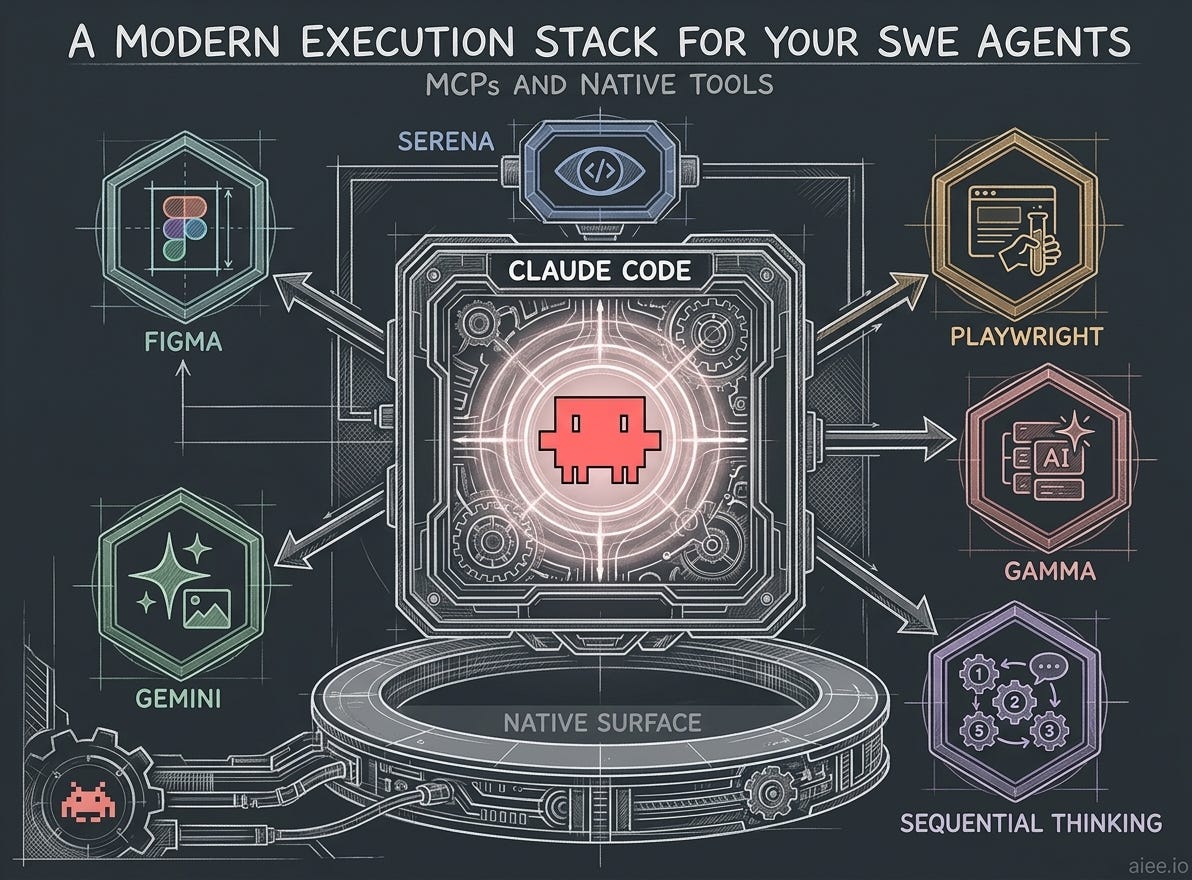
The Native Execution Surface
On March 31, 2026, a source map surfaced inside the Claude Code npm package — noted publicly by Chaofan Shou (@Fried_rice) on X — and gave the community an unintended look at the inner workings of the harness. It revealed the details of the native execution surface: bash access, file operations, search, language server support, and the ability to spawn subagents.


The leak confirmed a deliberately narrow default surface: fewer than 20 tools, purpose-built rather than general. Bash for shell, but Read/Write/Edit for files (not cat/tee/sed), Grep/Glob for search (not raw shell pipes), Task for spawning subagents, TodoWrite for in-session planning. Each tool has structured arguments and predictable failure modes. Narrower surface than a POSIX shell, by design.
The native surface also includes full LSP support — go-to-definition, find references, symbol resolution across the codebase. The IDE-grade floor is there before any MCP loads.
The native layer also exposes hook checkpoints that fire around every tool call — PreToolUse before the action, PostToolUse after — plus session-lifecycle hooks (SessionStart, PostCompact, Stop) that wrap the conversation itself. I use them sparingly, on a tight discipline: load context, surface signal, never mutate memory or commit on my behalf. In my notebook vault, three small hooks load recent journal context at session start and surface a reminder when wiki content has changed — the writes still happen through Claude, with my eyes on them, never auto-mutated.
The next section shows what MCP adds on top.
My go-to MCPs and how they fit my client work
This is the tool shelf I actually use at AIEE to set agents in motion on client work. Each MCP server below earns its place by closing a specific loop — browser, design, presentation, sustained reasoning — that the native surface alone can’t reach.
Serena
Serena is the difference between an agent grepping its way through a 200-file service and an agent following the dependency graph the way I would in an IDE. With it loaded, the session has go-to-definition, find references, and symbol navigation natively. The time my teams spend looking for and reading code drops sharply, and they move a lot faster as a result.
Playwright
Playwright MCP gives the agent a browser. It navigates pages, clicks, fills forms, takes screenshots, captures network requests. Whenever one of my web UIs gets modified, I run a regression workflow that sends a QA specialist agent into the browser to look at the changes and audit against visual best practices. The agent does the visual tests while I go grab a coffee or start the next task.
Figma
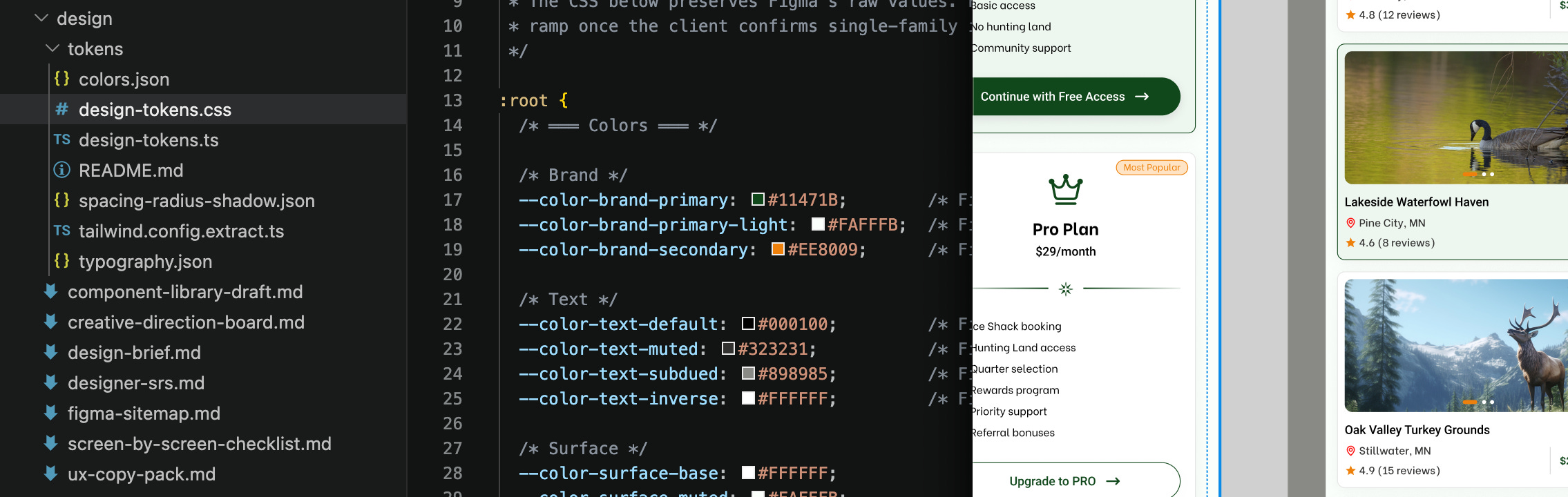
Figma MCP makes my design files readable during a session. My agent teams read the Figma source directly to extract design tokens, build the design system, and mirror the source designs in code — no screenshots, no copy-pasted specs. I’ve also tried using it to generate wireframes from scratch, but that path still needs too much manual support to lean on; for now I’m using it for reading and understanding only, and that alone is extremely useful.
Gamma
Gamma MCP generates presentation-grade decks and pages from structured input. I run it alongside a set of Gamma-specific skills I’ve built — when I want a deck, one of my frontend agents walks me through a short set of definition questions (audience, tone, visual direction, length) before any generation happens. The output lands close to ship-ready because the visual decisions were made up front, not negotiated with the model after the fact.
Sequential thinking
Sequential thinking MCP keeps earlier decisions reachable across a long task. On a refactor that spans three or four services, the first decision the agent makes about the contract is usually the one it forgets six tool calls later — Sequential Thinking is what holds it in place. I keep it on by default for any large codebase where long files erode context fast. It doesn’t eliminate drift, but on tasks where drift is the main failure mode, it’s the right constraint.
Gemini for image generation
The one item on this list that isn’t an MCP — it reaches my sessions through a custom skill that calls the Gemini API directly, with a prompt-engineering layer I’ve tuned over time. Every image on my websites is generated this way: either an agent specialist runs the full flow autonomously, or I use prompts a Claude agent produces through the same skill.
For installation, follow the link on each tool above — the official docs carry the current setup instructions. If you want to see the agent team that puts these tools to work, take a look at the aiee-team repo.
Underneath all of this — the native surface, the MCPs, the agents that wield them — sits a memory substrate that doesn’t execute anything but holds everything together: shared knowledge, agent episodes, personal workspace, compiled skills. Article 5 is what that substrate looks like, and how 20 specialist agents write to it without drowning the signal.
Further Reading
Bilgin Ibryam — 12 Agentic Harness Patterns from the Claude Code Leak — practitioner analysis of the March 2026 source map; useful companion to the Native Execution Surface section.
Anthropic — Introducing the Model Context Protocol — origin announcement (November 2024) for readers who want the protocol’s history.
Series: Cognitive Domain Engineering
Cognitive Domain Engineering — A Framework for Self-Improving AI Systems
A modern execution stack for your SWE Agents: MCPs and native tools ← you are here
The Human as Training Signal (coming soon)
From Amnesia to Adaptation (coming soon)